Best Console VPN

Best Console VPN: Performance, Privacy, and Gaming Reliability Breakdown

Gamers today face a common set of challenges: lag spikes, high ping, geo-restrictions, and even DDoS attacks during competitive play. That’s why many are searching for the best console VPN to improve their gaming experience. A console VPN not only enhances privacy but also optimizes network performance, making it a must-have tool for serious players. If you’ve ever wondered “How to Reduce Lag Spikes Over Wi-Fi” or struggled with matchmaking delays, this guide will break down how the best console

Read More »

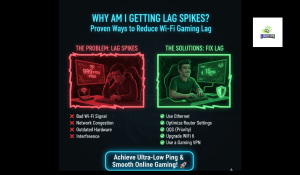
Why Am I Getting Lag Spikes? Proven Ways to Reduce Wi-Fi Gaming Lag

If you’ve ever shouted, “Why am I getting lag spikes?” during an intense gaming session, you’re not alone. Lag spikes over Wi-Fi are one of the most frustrating issues gamers face. They can ruin competitive matches, disrupt immersion, and even cost you victories. Understanding the causes and solutions is essential for smoother gameplay. This guide provides a comprehensive, SEO-optimized, and expert-backed breakdown of why lag spikes occur and how to reduce lag spikes. Whether you’re playing Call of Duty, Fortnite,

Read More »
How to Reduce Lag Spikes Over Wi-Fi While Gaming

How to Reduce Lag Spikes Over Wi-Fi While Gaming? Proven Fixes!

If you’ve ever asked, “why am I getting lag spikes?” in the middle of an online match, you know how frustrating it can be. Lag spikes — sudden bursts of latency — disrupt gameplay, cause rubberbanding, and can even lead to lost matches or bans. This guide provides expert-backed solutions, case studies, and actionable tips to help you reduce lag spikes over Wi-Fi while gaming. Whether you’re playing Call of Duty, Warzone, Valorant, or Fortnite, these fixes will help you

Read More »
How to Connect PS4 to the Internet Wireless

How to Connect PS4 to the Internet Wireless & Best Settings (Easy Guide)

Want to improve your PS4’s connection for faster downloads and smoother online gaming?This quick guide shows you exactly how to connect your PS4 to the internet wirelessly and set the best DNS and network settings for optimal performance. Step-by-Step Guide to Connect PS4 to the Internet Wirelessly Connect with LobbyVPN Once the DNS setup is complete, restart your device and head over to:👉 https://lobbyvpn.com/dashboard Select your desired location on the LobbyVPN dashboard.Important: Ensure your phone (the device accessing the dashboard) is connected

Read More »

Custom DNS Setup for Xbox

⚡ Why Set Custom DNS? Using custom DNS helps improve connection speed, stability, and reduce lag during gameplay.Set these DNS addresses for the best gaming experience: Primary DNS: 185.164.138.20 Secondary DNS: 45.82.67.59 🧭 Step-by-Step Guide Open your Xbox Console. From your controller, go to the Home Screen. Navigate to the top-left corner and select Profile & System. Choose Settings ⚙️ Go to General → Network Settings Select Advanced Settings Choose DNS Settings Select Manual Enter the following: Primary DNS: 185.164.138.20

Read More »
Best VPN for Call of Duty

Best VPN for Call of Duty (2026): Low Ping, No Lag & DDoS-Proof Gaming

If you’ve ever been kicked from a match mid-fight, trapped in lag spikes, or forced into high-skill lobbies by SBMM (Skill-Based Matchmaking), you already know how frustrating Call of Duty can be without the right tools. Whether you’re playing Warzone, Modern Warfare III, or CoD Mobile, stable speed and low latency often mean the difference between winning and respawning. That’s where a VPN for Call of Duty comes in — not just any VPN, but one built specifically for gaming

Read More »